Conversion Funnels
What This Guide Does — A Build Your First Funnel walkthrough covering the Conversion Funnels Dashboard and how to create and compare funnels.
Why It Is Useful — Conversion Funnels turn your raw tracked events into a clear view of where users complete, or abandon, a specific path — like signing up and placing a first bet.
Before You Start — Visitor Tracking should already be recording events, since Conversion Funnels reads its steps from that same event data.
How to Use It
Open Funnels
Under Analytics Agents, click Funnels.
Create a New Funnel
Click + Create Funnel on the Funnels Dashboard.
Name the Funnel and Add Events
Enter a name, optionally set it as Primary Funnel, then select events from Available Events.
Arrange, Classify, and Save
Order the events, assign stages and conversions, then click Save Changes.
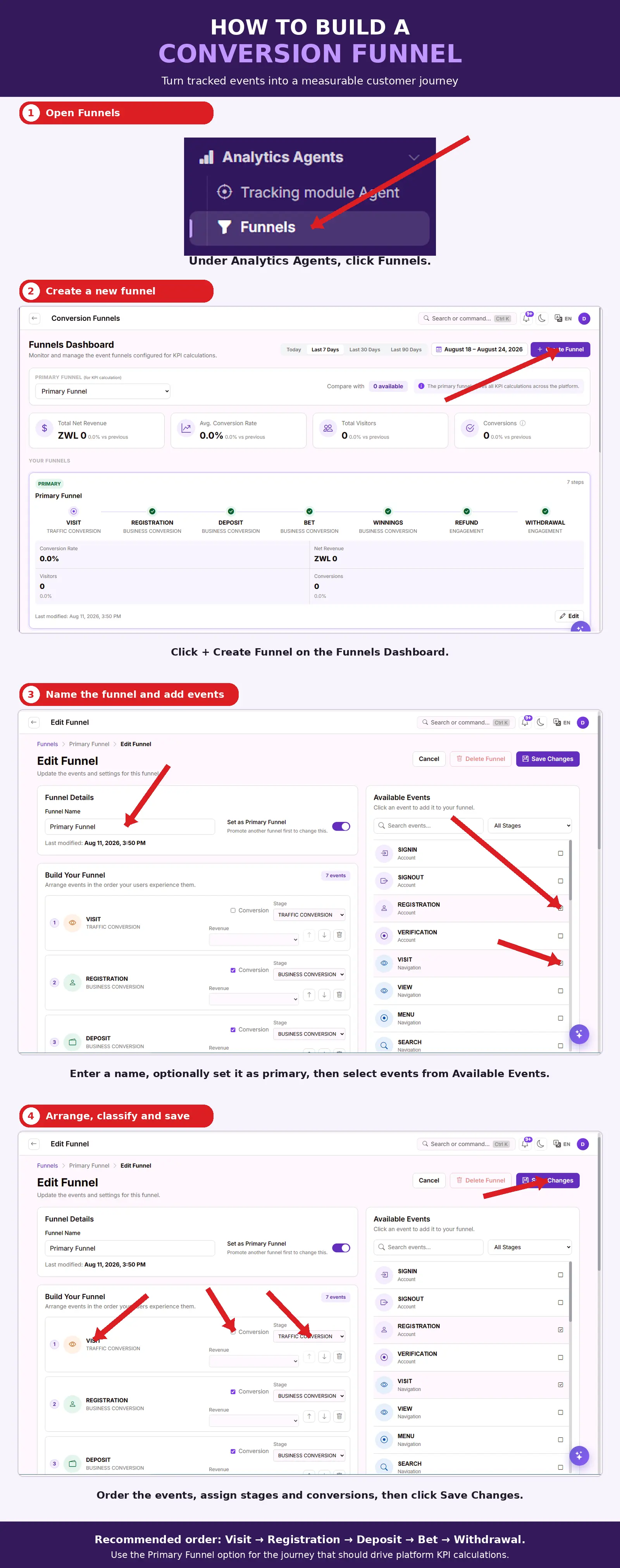
What You Should See — A new funnel listed on the Funnels Dashboard, showing a conversion percentage at each of its steps.
Tips
- Recommended order: Visit → Registration → Deposit → Bet → Withdrawal.
- Use the Primary Funnel option for the journey that should drive platform KPI calculations.
Related Guides