Audience Groups
What This Guide Does — Explains Dynamic vs. Static segments and how to create one.
Why It Is Useful — Audience Groups let you group contacts by rule or by list, so you can target the right audience when messaging or reporting instead of working with your full contact base every time.
Before You Start — Understanding the difference between segment types makes it much easier to build the right one. Dynamic segments use rule-based logic, such as "customers who placed their first bet," and update automatically as contacts match or stop matching that rule. Static segments are fixed lists that only change when you edit them yourself.
How to Use It
Open Audience Groups
Go to Audience and click Audience Groups.
Review Segment Summary
Use these cards to quickly see how many segments you have and how they are split: Total Audience Groups, Dynamic, and Static Lists.
Search and Filter Audience Groups
Use search and filters to find the right segment faster.
Understand the Segment List
Dynamic segments update automatically. Static segments are fixed lists unless you edit them.
Start a New Segment
Click here to add a new segment.
Create and Save the Segment
Enter a name, choose Dynamic or Static, build conditions and groups to define your rule or list, then save.
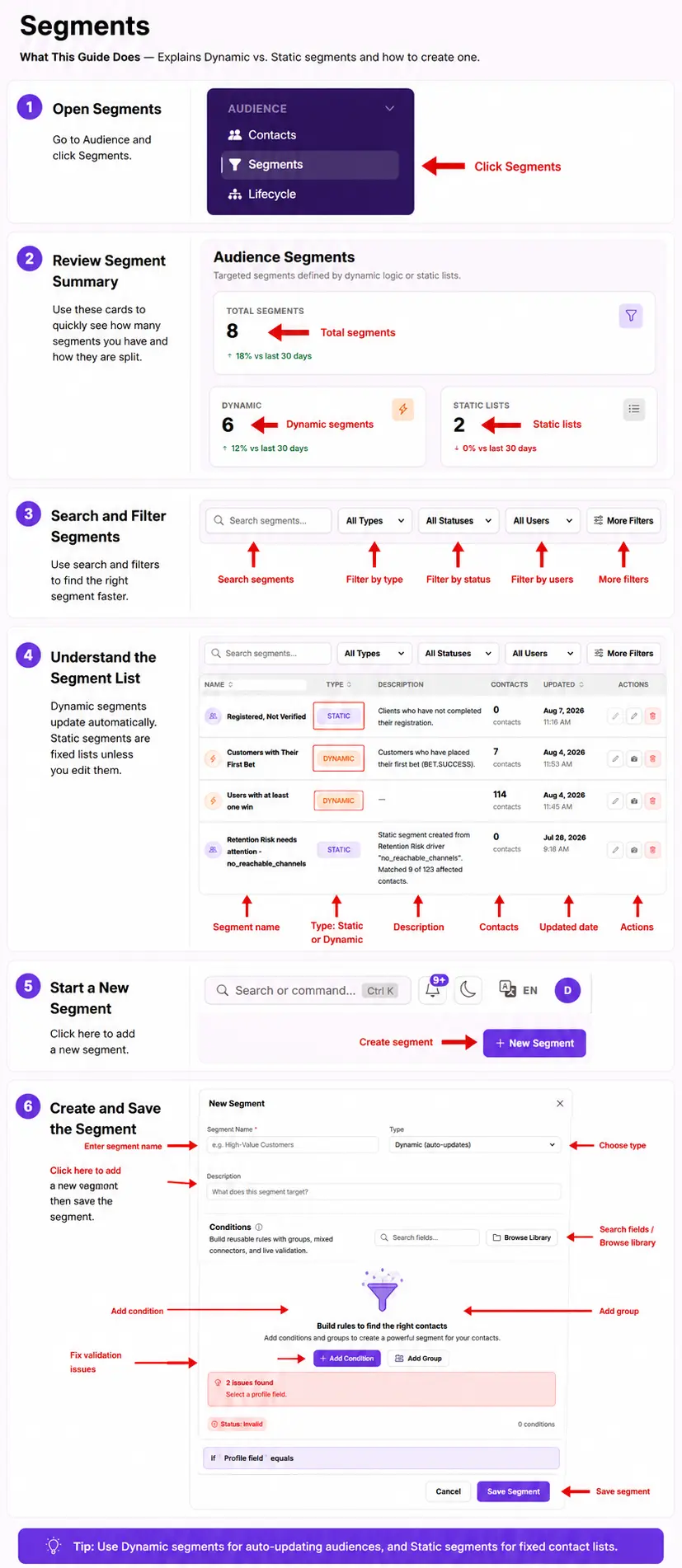
What You Should See — Your new segment appears in the table with its current contact count, which updates automatically for Dynamic segments as contacts qualify.
Tips
- Use Dynamic segments for auto-updating audiences, and Static segments for fixed contact lists.
Related Guides