How to Connect a Meta, X, LinkedIn, or ChatGPT Ads Account
Connect an advertising account to NOMMOS Ad Campaigns.
Open Ad Campaigns
Open Ad Campaigns, then select Configuration.
Connect Your Meta Ads Account
Select Connect Meta Ads. A green "Connected" badge confirms success.
Connect or Reconnect Your X Ads Account
Select Connect X Ads — or Reconnect if the account was linked before.
Connect Your LinkedIn Ads Account
Select Connect LinkedIn Ads. A green "Connected" badge confirms success, and Reconnect replaces the button afterwards.
Connect Your ChatGPT Ads Account
Select Connect ChatGPT Ads, then paste the Ads API key you created in OpenAI Ads Manager under Settings, API keys. One key connects one ad account.
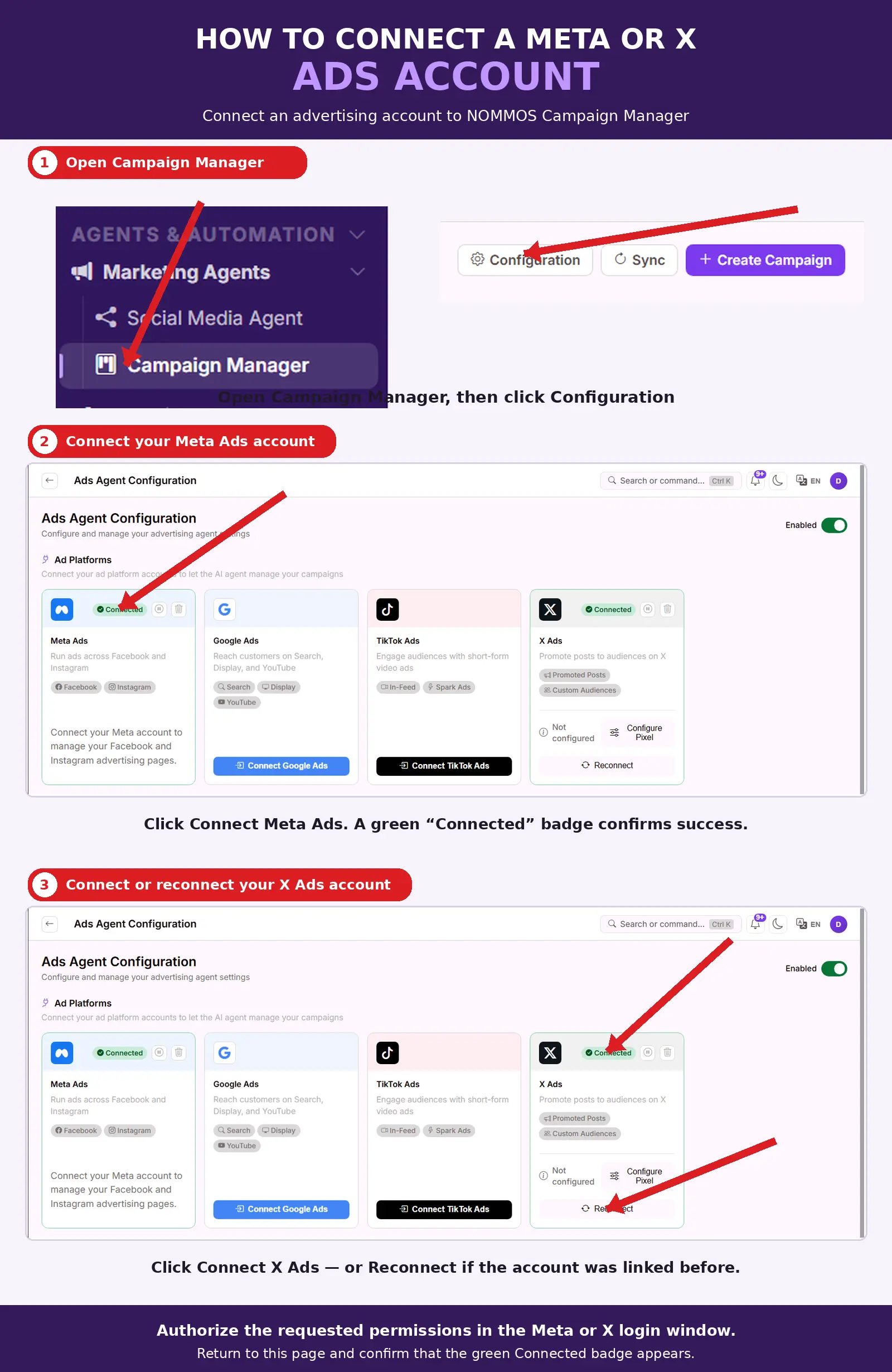
Authorize the requested permissions in the Meta, X, or LinkedIn login window, then return to this page and confirm the green Connected badge appears. ChatGPT Ads has no login window — NOMMOS checks the pasted key with OpenAI and the account appears once it is accepted.
Related — Full guide: Ad Campaigns. Also see: How to Launch Your First Ad Campaign.