How to Launch Your First Ad Campaign
A quick step-by-step guide in NOMMOS Ad Campaigns.
1
Open Ad Campaigns
Open Ad Campaigns, then select + Create Campaign.
2
Select Meta
Choose Meta as your advertising platform.
3
Continue
Select Continue to move to the next step.
4
Complete the Campaign Basics
Enter your campaign name, objective, initial status, and special ad category.
5
Set Budget, Strategy and Dates
Set your budget type, budget, bid strategy, and start and end dates.
6
Review and Launch
Review your campaign details, then select Launch Campaign.
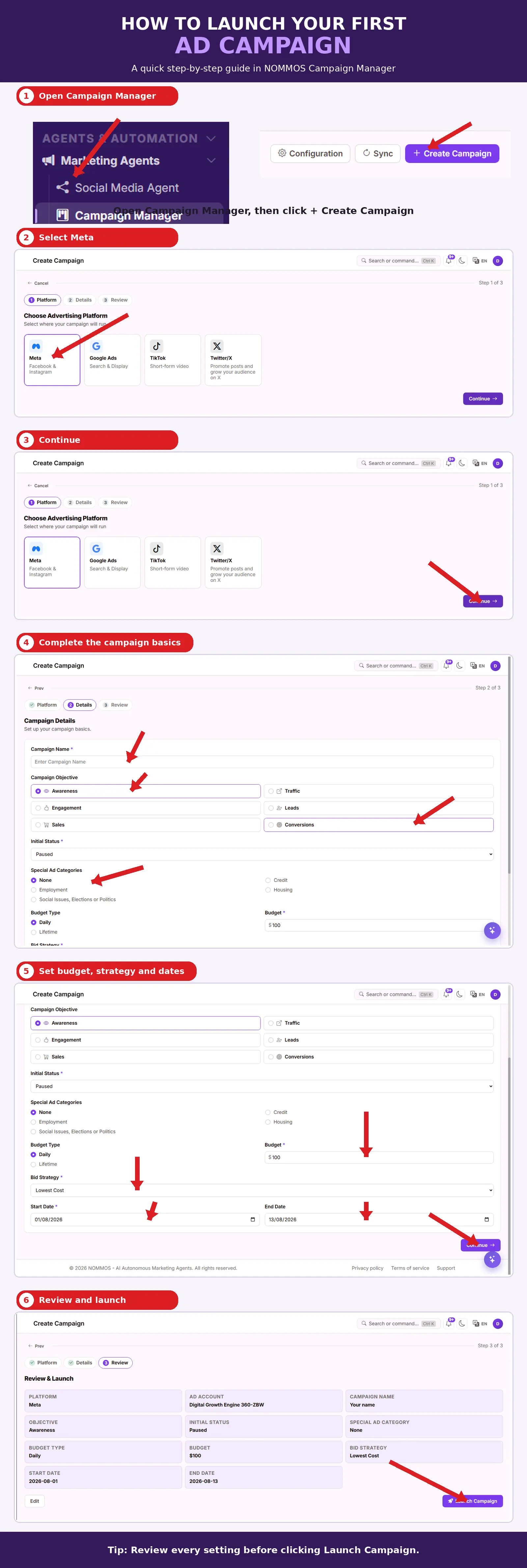
Tip: Review every setting before selecting Launch Campaign.
Related — Full guide: Ad Campaigns. Also see: How to Connect a Meta, X, LinkedIn, or ChatGPT Ads Account.