Smart Insights
What This Guide Does — Explains the model categories and how to read a model card.
Why It Is Useful — Surfaces which contacts are likely to churn, engage, or convert, and why, so you can act before an opportunity or a customer is lost.
How to Use It
Open ML Insights
Open CRM and select ML Insights under Intelligence.
Set the Insight View and Period
Switch between Category View and Model View, choose the reporting period, refresh the data, and review active categories, affected contacts, and recommended actions.
Review a Category Insight
Select one of the six categories. Read affected contacts, severity, seven-day trend, top driver, and contributing models.
Inspect Affected Contacts
Review the contacts affected by the selected insight and their confidence scores. Click View in Contacts to open the full audience for targeting or follow-up.
Compare Engagement and Customer Value
Use Engagement to identify inactivity and reachability issues. Use Customer Value to find weak value scores, high-value segments, and the model signals behind each recommendation.
Interpret Healthy or Empty Categories
A Healthy category with zero affected contacts means the current model found no contacts matching that risk. Still review top drivers and recommended actions for model limitations.
Use Personalization Recommendations
Review channel preference and channel optimization signals, inspect critical delivery warnings, and use the suggested CRM actions to improve frequency, channel choice, and relevance.
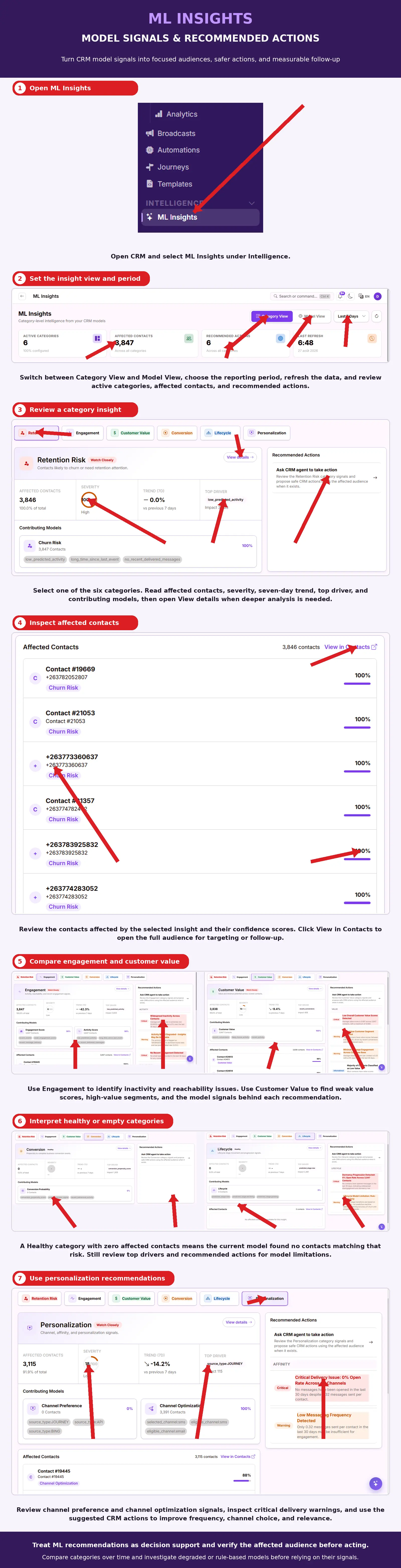
What You Should See — A model card listing affected contacts, an impact score, the top factors behind it, and one or more recommended actions you can take.
Tips
- Start with Recommended Actions if you're short on time — they translate the score straight into a next step.
Related Guides
How Churn and Engagement Scores Work
Churn and engagement scores are AI-derived signals based on each contact's activity patterns, such as how recently and how often they've interacted with your brand. NOMMOS uses these patterns to estimate which contacts are likely to disengage or convert, so you can prioritize outreach accordingly.